
How to Set a Target
First, you will need to navigate to the Targets section through the Governance tab. If you need more information on how to do this, please view our article on How Do I View a Target?
To set a target select the +Add Targets blue button in the top right hand corner. It looks like this.

From here you will see the following pop up window, where you will enter all the details regarding the target you would like to set.
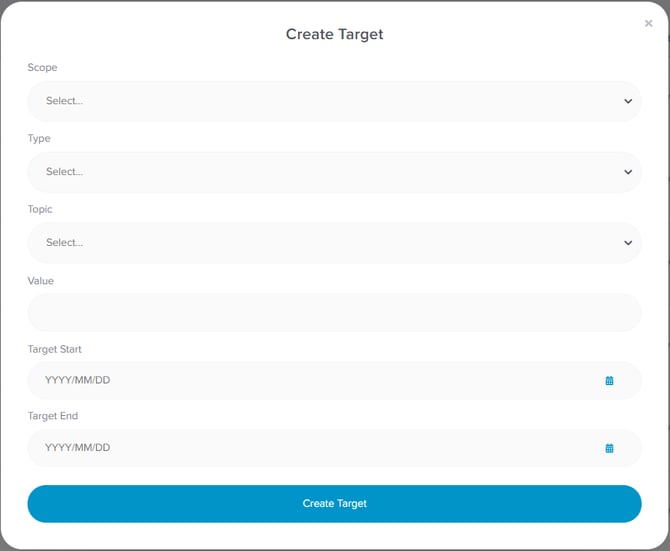
Complete the modal with the information required.
- Scope- This drop down allows you to focus the target to a specific part of your organisation.
- Account - Your entire Organisation
- Location - A specific site within your organisation
- Tag - Not always used in every Rio account, but if you are grouping your locations. Tags is the method in which you would do this
- Type- This is where you can decide the framing of the target. There are two types to select from.
- Achieve-
- Reduce-
[INSERT TIP re when to use an Achieve target versus and Reduce target...]
- Topic- the type of data for which the target relates to.
- Carbon Emissions
- Electricity Consumption
- Natural Gas Consumption
- Transport
- Waste Generation
- Water Consumption
- Value - the numerical figure that you want to achieve (or reduce)
- Unit - depending on which topic you select for the target, the appropriate unit will populate in this section
- Target Start- TO BE INSERTED
- Target End- TO BE INSERTED
Now to submit the target, you just have to select the Create Target blue button at the bottom of the modal. It will then be populated into the dashboard with all your other targets.
Determining The Status of The Target
You will be able to view the status of all your target in the Targets dashboard. The status of the target is interlinked to the data you have uploaded to the platform. It will tell you if your target is on track for completion or not through the following symbols.
 You are on track to achieving your target
 You are not on track to achieving your target
 Action is required for this target
For more information on targets, you can view our handy articles below.